




Institutional Assessment & Accreditation Solutions
NAAC assessment and accreditation is a robust process. It has seven criteria and several key indicators. The institution going for NAAC accreditation has to prepare data and reports to be uploaded on NAAC portal. We have simplified NAAC accreditation process by developing Institutional Assessment and Accreditation Solutions (iAAS) software. The iAAS Software that you choose will make your IQAC paperless and efficient. The data filled by different stakeholders of institution is streamlined and available in IQAC portal and auto classified as per NAAC criteria requirements. Data templates are generated for uploading on NAAC portal as well as reports are generated and can be downloaded in pdf format. The iAAS software makes the NAAC documentation process easy and simplified. The software is user friendly and self explanatory. Pilot SSR and AQAR can be generated in the software
Designed as per New NAAC guidelines from June 2024 for Accreditation and Assessement
IQAC
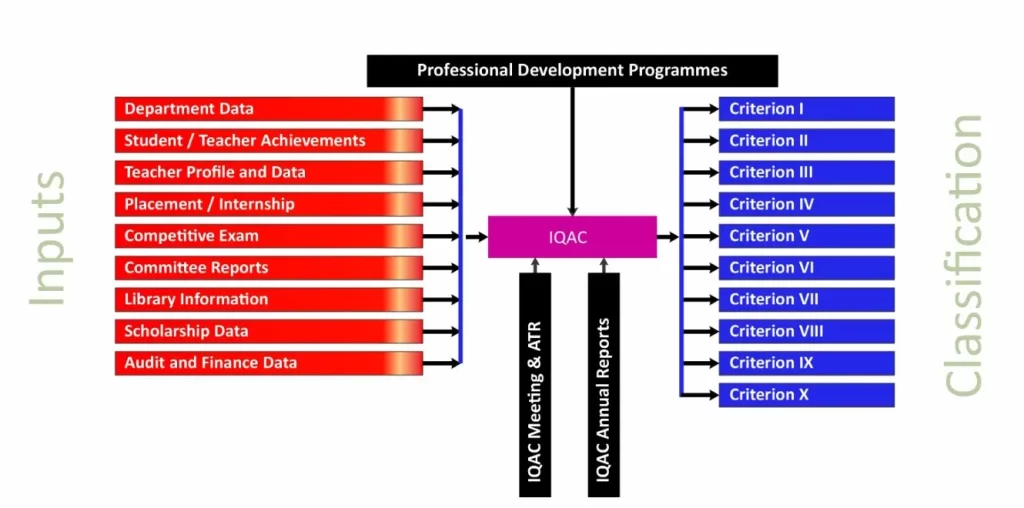
iAAS is a College IQAC Management System for assessment and accreditation purposes. This software developed by Transfinite Innovative Solutions Pvt Ltd. As per GOI and UGC norms, each Higher Education Institution is required to go for NAAC and NBA accreditation also required to submit Institutional data to national ranking agencies like of the last several years. During the process the colleges face the difficulties in collecting data. iAAS offered solutions for this and makes IQAC technology enabled and paperless. Portals are available for IQAC, Department, Teacher, Library, Feedback, Committees, office.
This software enables Colleges to manage data required for assessment and accreditation. It is real time data management software in which reports are generated as per NAACs seven criteria model.
IQAC Inputs
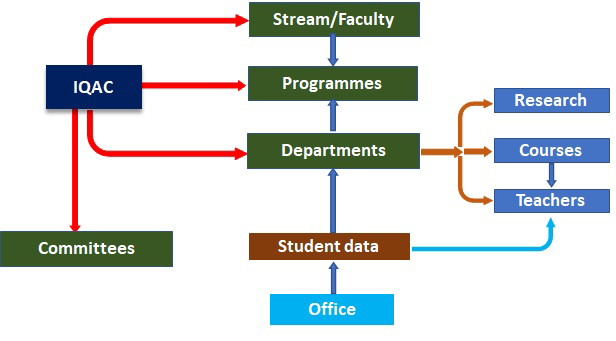
IQAC has separate portal and it is controlling authority IQAC creates streams or faculties in available in the college and classes with divisions IQAC creates departments and provide login credentials IQAC prepares list of Programmes and classes as per college programmes and classes IQAC creates committees and provide login credentials to chairman Each department HOD creates teacher login, list of courses Office has separate login for for uploading information. All the information filled by Department, Teacher, Committees, Library, Office appears in classified way in IQAC portal for view and download.
Department Module
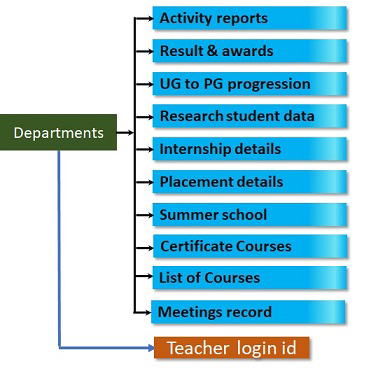
Information from academic departments is very important for assessment and accreditation purposes. The iAAS software made it easy to collect data from departments in classified format.
Each created Department has portal in which separate tabs will be available for:
- IQAC has a separate portal and is the controlling authority.
- IQAC creates streams or faculties available in the college and classes with divisions.
- IQAC creates departments and provides login credentials.
- IQAC prepares a list of programmes and classes as per college programmes and classes.
- IQAC creates committees and provides login credentials to the chairman.
- Each department HOD creates teacher login, and a list of courses.
- The office has a separate login for uploading information.
- All the information filled by the department, teacher, committees, library, and office appears in a classified way in the IQAC portal for view and download.
Teacher Module
Information from teachers is very important for assessment and accreditation purposes. The iAAS software made it easy to collect data from departments in classified format.
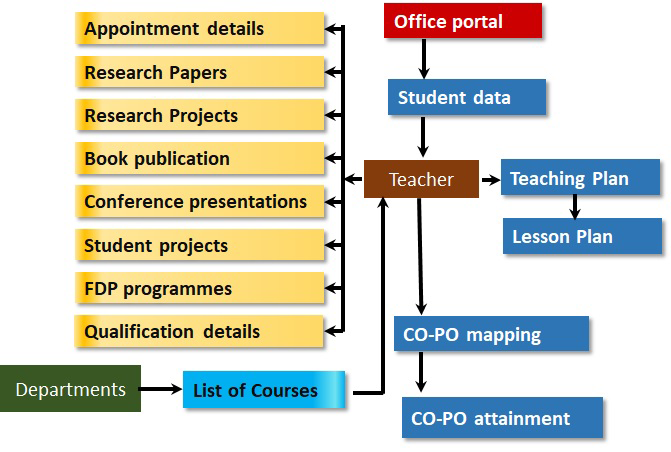
Each created Teacher has portal in which separate tabs will be available for:
- Personal Information, appointment and approval details
- Teaching Plan can be generated
- Lesson Plan can be generated
- Research Students information : PH. D. registered and declared
- Project/Field work of students
- Research paper, book publication and proceeding publication as well as conference presentations and participation can be added
- FDP programs attended can be added
- Research project information can be uploaded
- CO-PO mapping sheets can be generated
- On the basis of assessment results, attainment of COs and POs calculated
- List of ICT resources can be added
- Reports on innovative teaching methods can be generated and uploaded. Pdf file will be generated.
- Awards received can be uploaded.
- In each case above teacher can upload documents as proof.
Teacher Biodata is generated using all filled information by teacher and can be downloaded
Committee
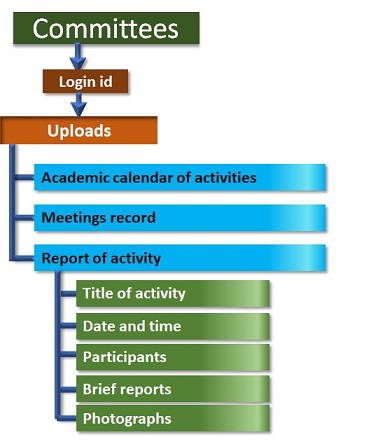
Login ID for each committee will be provided by IQAC.
Information from each committee:
- Meeting records
- Academic calendar of activities
- Report on Extracurricular activities
- Students Achievements: Sports, cultural or extension activities
- Awards Received for Extension – Government, International & Private
- In each case committee chairman can upload documents in pdf format.
Library
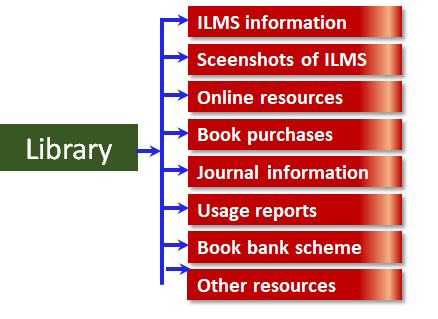
Information from Library, committees and Office is very important for assessment and accreditation purposes. The iAAS software made it easy to collect data from all these in classified format.
Separate Module for Library
Information from the Library:
- ILMS Details
- List Of Book Bank scheme
- List Of Purchases-Books, journals and other resources
- List Of Rare Books
- List Of Resources-online
- List Of Resources Visually Impaired
- Usage reports
Office
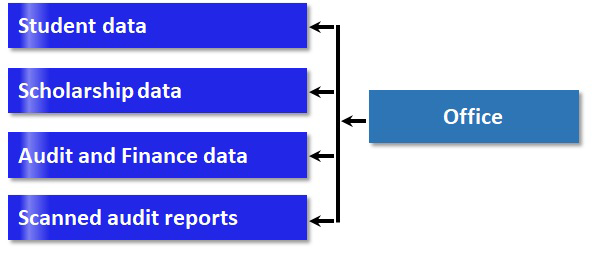
Information from the Office:
- Year-wise and Class-wise student list upload. This list available for teacher and department.
- Student Scholarship details: Government and institutional
- Account details: Expenditure on physical, academic facilities and maintenance
Feedback Module
Separate portal is provided for feedback from teachers
- Feedback forms can be created on different aspects
- These feedback forms can be sent to teachers
- Feedback forms will be availble in teacher portal
- Feedback forms filled by teachers will be available in feedback portal for further analysis
Criterion Module
Information from all stakeholders will be auto segregated criterion-wise and is available in criterion module. Each criterion head has separate log-In credentials
- Information from all stakeholders is auto classified as per required inputs for that criterion
- Each Criterion Incharge will get all the information filled by all stakeholders as per criterion
- IQAC can create Dummy SSR/AQAR
- Metric wise inputs with documenatry proofs can be filled by criterion incharge/committee
- The filled information can be checked nd edited by IQAC in IQAC portal
Unlock Features with a Quick Demo